Scrolling by VOICE.
You speak and the text moves with you. Promter senses when you're talking and advances the script at your pace, word by word. No speech recognition, no audio leaving your device.
You're the star. And the whole crew
You're the writer, the presenter, the camera operator and the director. Promter was designed for exactly that: a keyboard shortcut for every function, Bluetooth clicker support, mirroring for glass rigs, and a screen that won't go dark in the middle of your read.
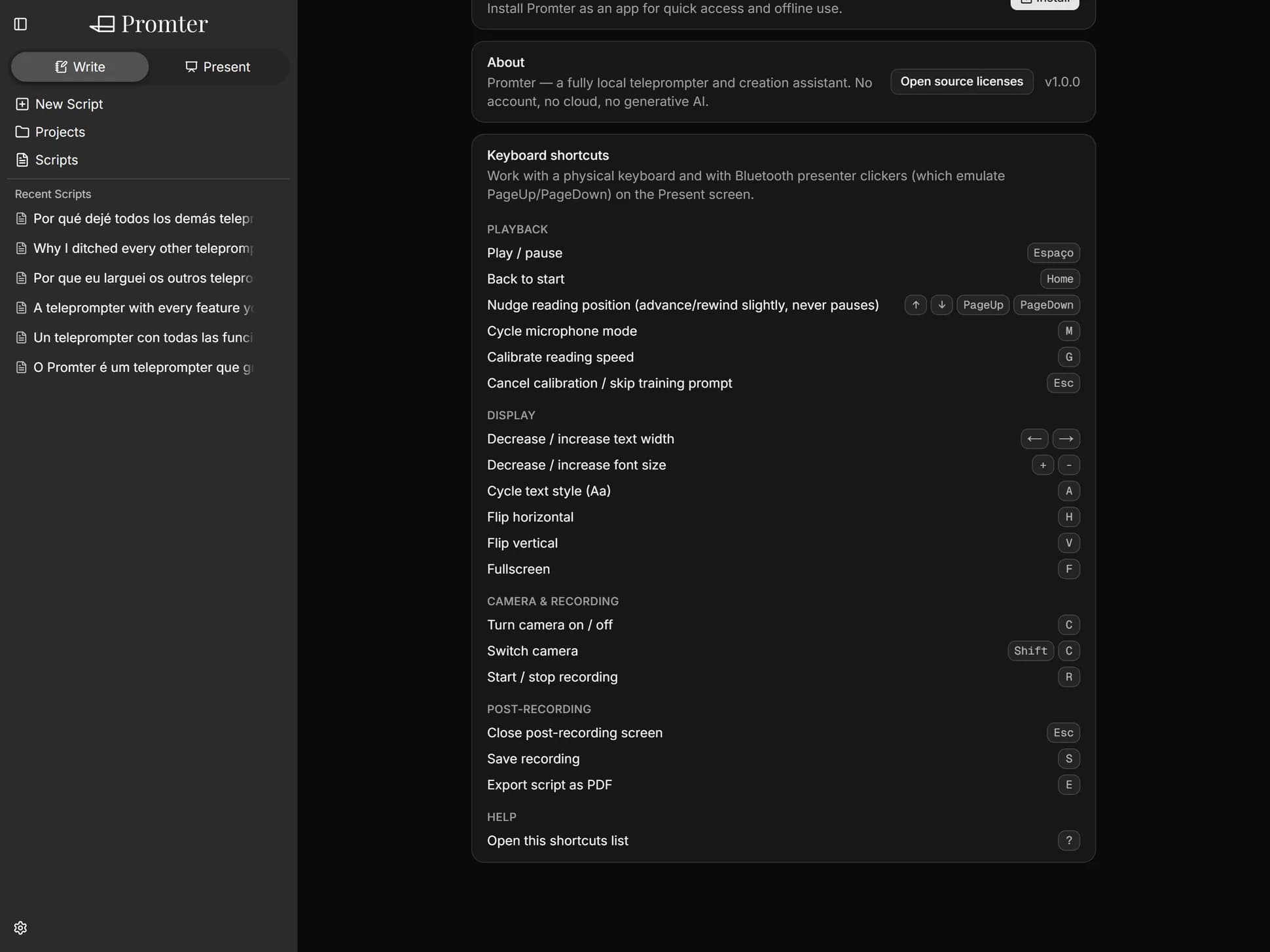
Every function on the presentation screen has a keyboard shortcut: play, pause, cycle the mic, calibrate, adjust reading position without pausing, change font, change width, mirror, fullscreen, switch camera, record.
And if you use a Bluetooth presentation clicker, it already works. Promter understands PageUp and PageDown natively. You stay in front of the camera, hands free, and adjust the prompter without leaving the frame or breaking your sentence.
The full shortcut reference opens with the ? key, right on the screen.
Wake-lock is active while you present. No phone dimming mid-sentence because you went ten seconds without touching it.
There's also a 3-second countdown, a draggable reading guide line that stays where you left it, 6 font sizes, 7 text widths and 4 reading styles: serif, clean, accessible and Roboto.
Horizontal and vertical mirroring, independent, so the text lands readable on the glass. Turn it on, adjust it and forget it: it remembers your setup.
There's a fair amount built specifically for rigs. We made a whole page about it.
There's no remote control from another device. The clicker works as a keyboard, not as a companion app. And the shortcuts need a keyboard or a physical clicker: on a phone with no accessory, control is by touch.
You speak and the text moves with you. Promter senses when you're talking and advances the script at your pace, word by word. No speech recognition, no audio leaving your device.
Point one device's camera at the other's screen and the script crosses over. No cable, no cloud, no account, no attachment. Send one script, just your settings, or the entire backup.
Turn off the wi-fi. It keeps working. Your scripts stay on your device, there's no account, and nothing you write ever leaves.
Just like your content, our editor is RICH when it's time to write. Mark the tone, the emphasis and the pause. It all shows up exactly the same when you present, and one click strips it if you'd rather have plain text. Saves itself, always.
Open your camera inside the app. Record video up to 4K at 60 frames per second without looking away from the screen, without stepping out of frame.
Horizontal and vertical mirroring, independent, so the reflection lands readable on the glass. Set it once and it remembers.
Promter runs entirely on your device. No server holding your scripts, no database with your account, no speech recognition API billing by the minute, no AI model billing by the request.
Mac, PC, Android, iOS, Linux. All you need is an up-to-date browser. No app store, no installer, no waiting on a download.
So I put together this FAQ to set your mind at ease.
It does, if it emulates PageUp and PageDown, which most do.
You can, without pausing.
No. Wake-lock stays active while you present.