Scrolling by VOICE.
You speak and the text moves with you. Promter senses when you're talking and advances the script at your pace, word by word. No speech recognition, no audio leaving your device.
Read, frame and record without switching devices
With Promter you see your script over your camera preview and record the video at the same time, right in the browser, up to 4K at 60fps. One device does both: script, framing and recording on a single screen, whether that's your phone, your computer or your tablet.
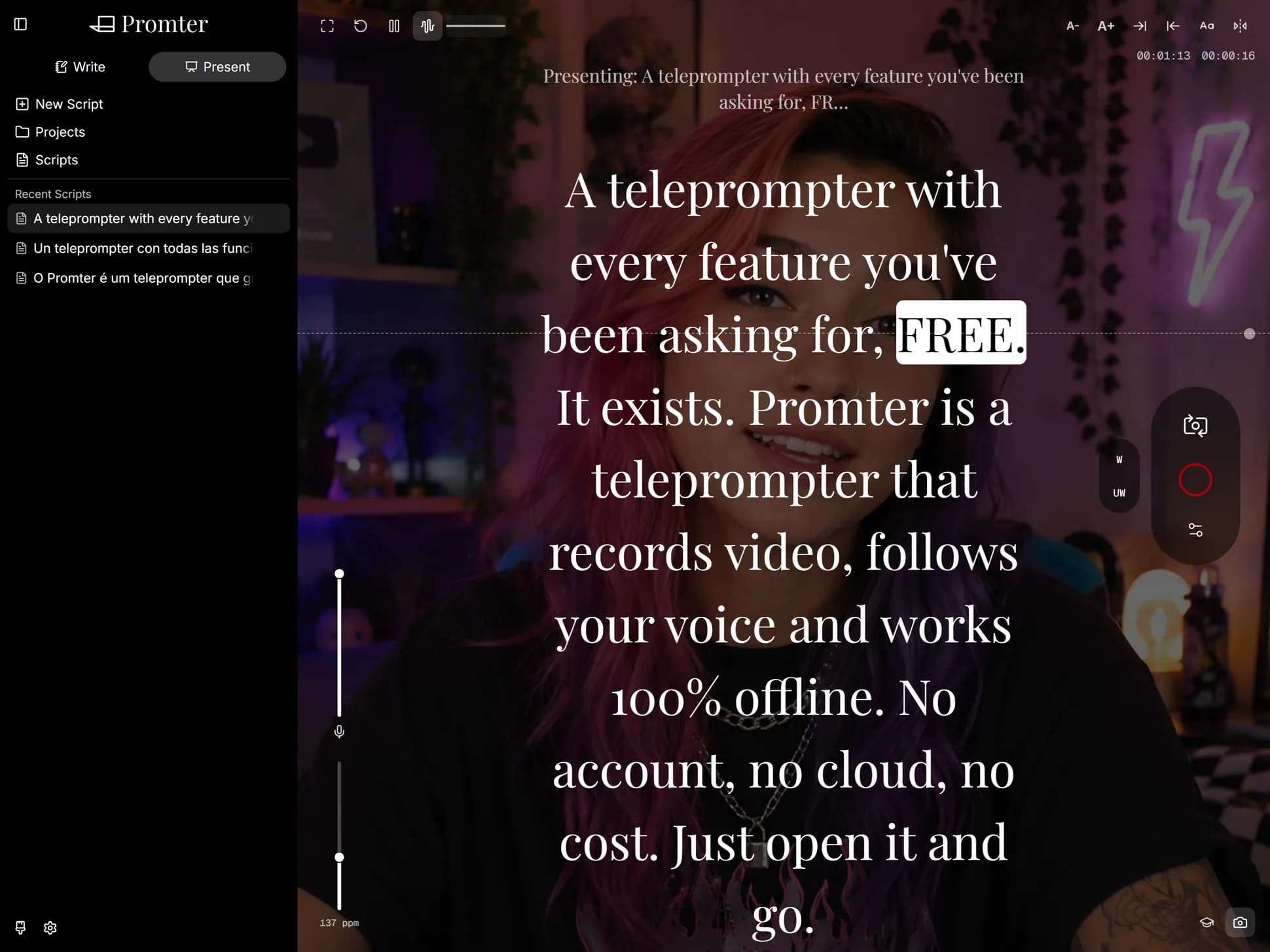
The text scrolls over your camera image, not next to it. That changes something viewers actually notice in the final video: you stop glancing at the corner of the screen and start talking to the person on the other side.
And since your image sits right behind the words, you catch the moment you drift out of frame, without stopping, checking and shooting again.
It detects every rear camera on your device, identifies which is ultra-wide, wide, tele and super-tele, and lines them up in a one-tap picker. On phones where the tele lens is only reachable through zoom, you get a continuous slider instead.
You can switch lens, switch quality or flip to the front camera mid-session, without cutting the take.
The video goes straight to your disk or to your system's native share sheet. And Promter offers you the script PDF alongside it, in case you want to file both.
If you close the tab with an unsaved recording, it warns you first. And if the browser discarded the file on its own, it tells you when you come back.
Promter records, it doesn't edit. No cuts, no music, no captions, no export with effects. The recording comes out as a file for you to assemble wherever you like.
Maximum quality also depends on your device: the app only offers what your camera actually delivers.
You speak and the text moves with you. Promter senses when you're talking and advances the script at your pace, word by word. No speech recognition, no audio leaving your device.
Point one device's camera at the other's screen and the script crosses over. No cable, no cloud, no account, no attachment. Send one script, just your settings, or the entire backup.
Turn off the wi-fi. It keeps working. Your scripts stay on your device, there's no account, and nothing you write ever leaves.
Just like your content, our editor is RICH when it's time to write. Mark the tone, the emphasis and the pause. It all shows up exactly the same when you present, and one click strips it if you'd rather have plain text. Saves itself, always.
And the camera operator, the director and the entire crew.
Which is why: a keyboard shortcut for every function, a Bluetooth clicker that works with zero setup, and a screen that won't go dark mid-read.
Horizontal and vertical mirroring, independent, so the reflection lands readable on the glass. Set it once and it remembers.
Promter runs entirely on your device. No server holding your scripts, no database with your account, no speech recognition API billing by the minute, no AI model billing by the request.
Mac, PC, Android, iOS, Linux. All you need is an up-to-date browser. No app store, no installer, no waiting on a download.
So I put together this FAQ to set your mind at ease.
If your phone records in 4K, yes. Promter only shows the qualities the active camera genuinely supports.
No. The file is created on your device and saved by you. There is no upload.
You can. The camera is a button: on and off. Rehearsing and recording are the same screen.